⚠ Scope and caveats. This report is a targeted diagnostic sample, not a comprehensive audit. Findings describe coordination failure patterns observed across these examples, and are not a conclusive assessment of the full stevemadden.com experience. The patterns are interesting and similar patterns show up across virtually every large DTC or enterprise retailer running a composable ecommerce stack. The report is intended as a conversation starter — questions and pushback welcome.
Executive Summary
This scan examined how signals from different systems at Steve Madden — search, promo engine, acquisition/loyalty program (SM PASS), CRM (email), social proof widgets, and checkout — combine on the customer-facing experience. It surfaces three patterns where those systems produced outputs that appear uncoordinated.
| # | Finding |
|---|
| 1 | Cross-surface coordination failure: SM PASS identity not carried through to checkout layer |
| 2 | Promo + markdown stacking: compound effect across different systems for margin planning |
| 3 | Social proof widget firing with low-activity signals, working against its own intent |
Finding 1 — Cross-Surface Coordination Failure
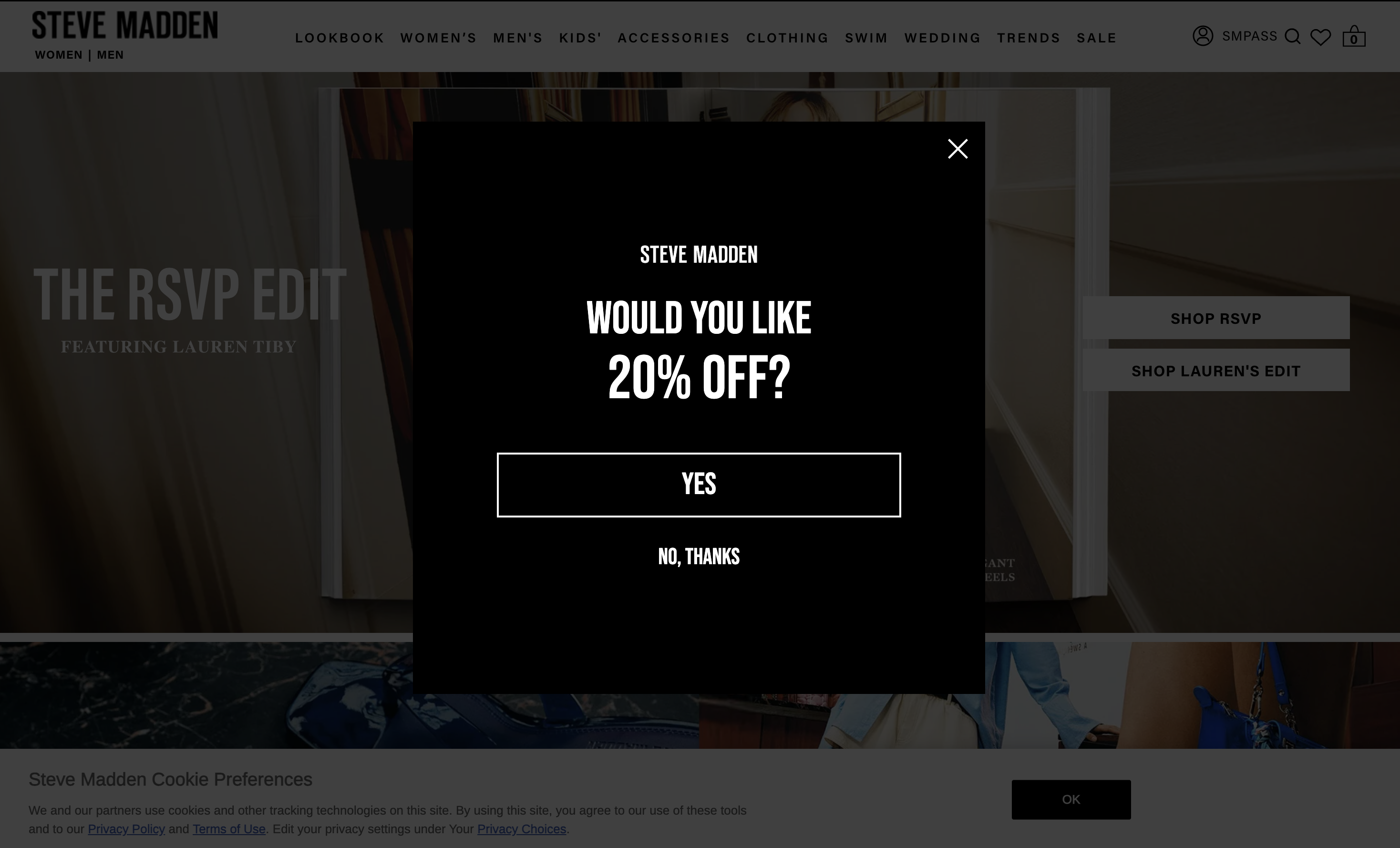
The site identified the visitor as a new customer and presented a "20% OFF" popup. The customer opted in — and two things happened: the site header began displaying "SM PASS" throughout the entire browsing session (across search results, product detail pages), and the promo code (WELCOME-4JRE-WF) was dispatched via email.
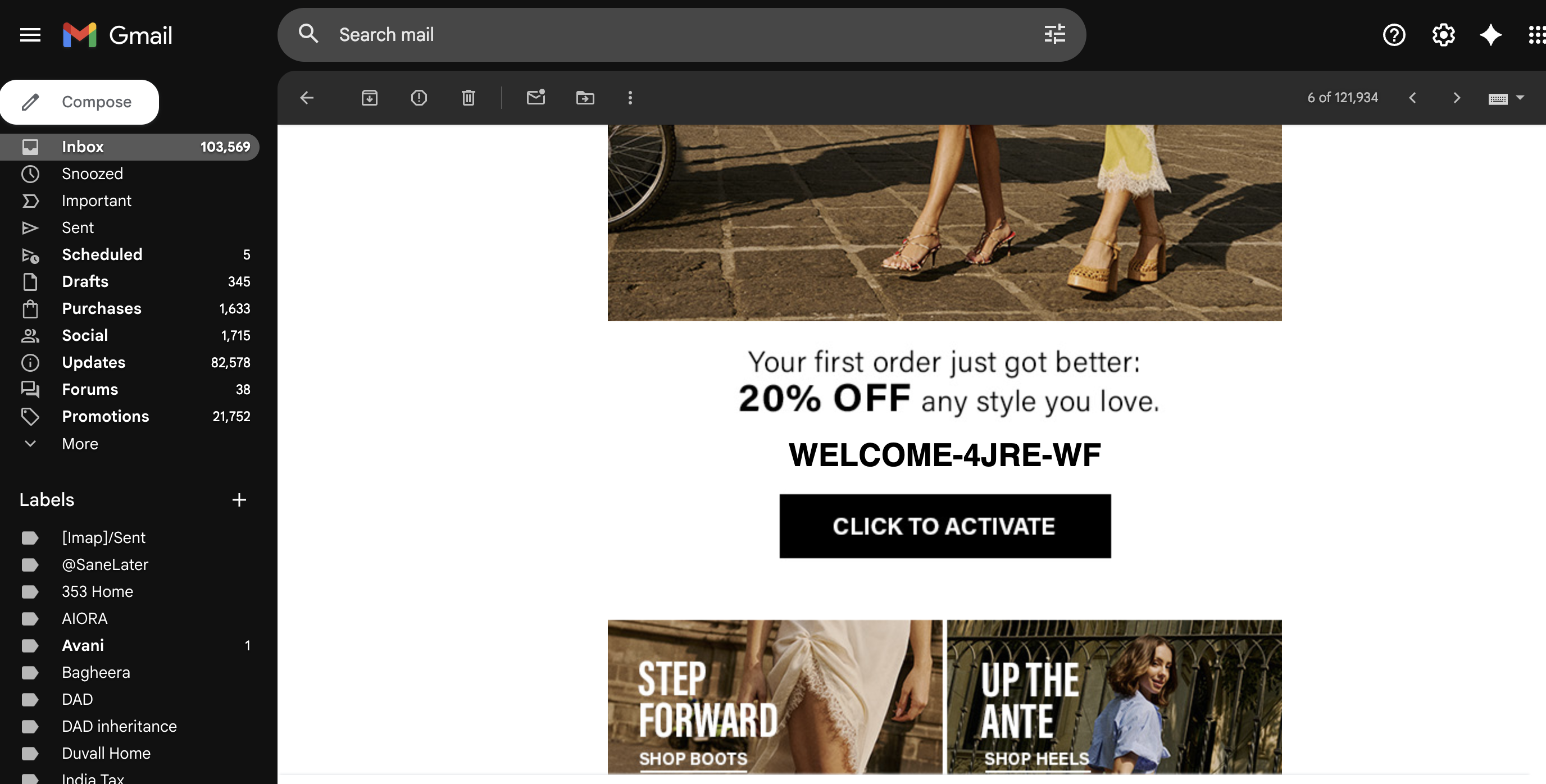
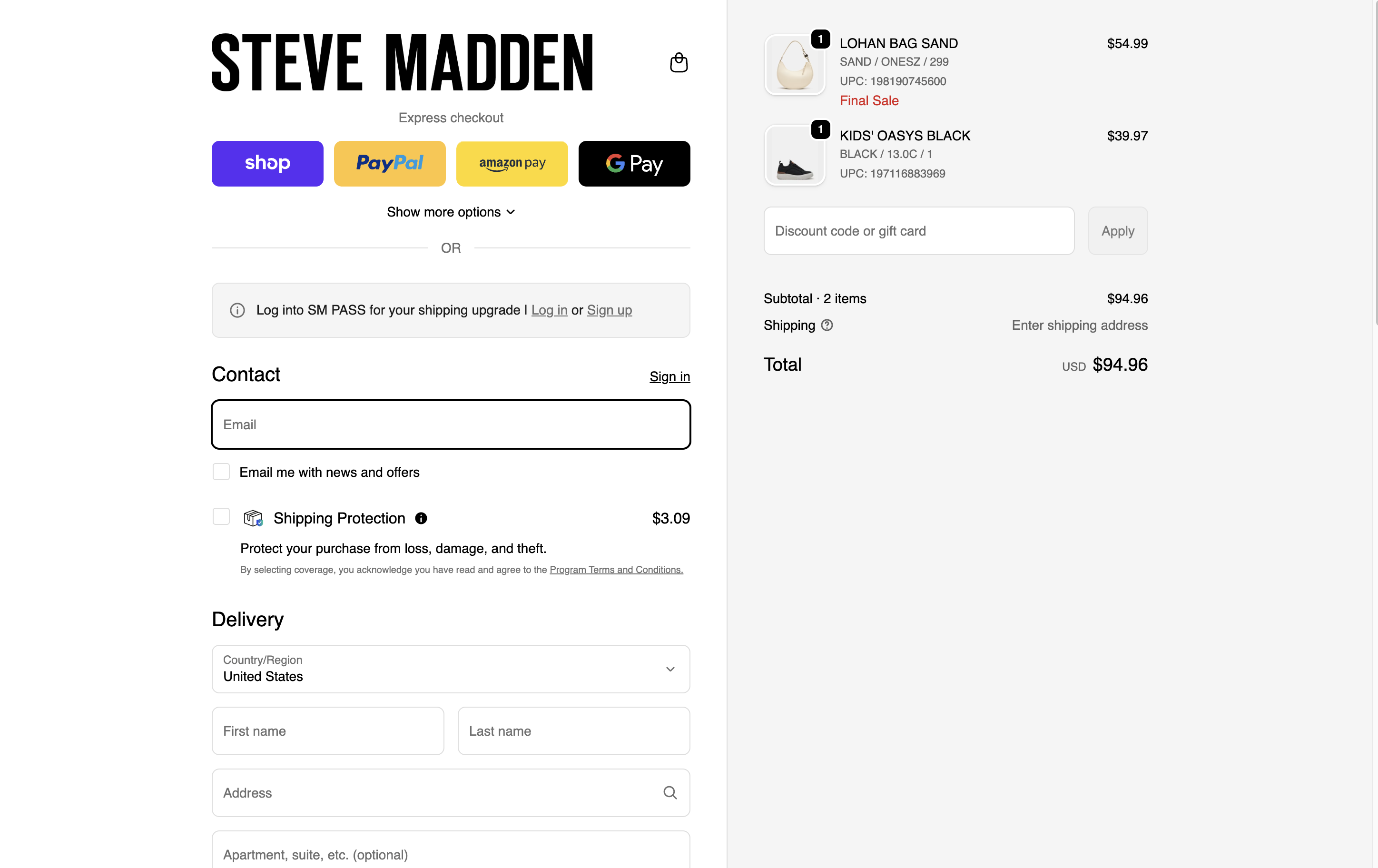
At checkout, neither signal carried through. The discount code field was empty. A banner read: "Log into SM PASS for your shipping upgrade | Log in or Sign up" — despite the customer being recognized as SM PASS throughout the session until then. The customer went to email. The CTA — "Click to activate" — returned them to the homepage, not the cart. They copied the code and applied it manually. Three systems each had the right context but did not coordinate to close the loop.
The customer journey
Step 1: Homepage
Popup offers 20% off
Customer opts in
→
Step 2: Session
SM PASS recognized in header throughout browsing
→
Step 3: Email
Code WELCOME-4JRE-WF delivered.
"Click to activate" → returns to homepage
→
Step 4: Checkout
Discount field empty. SM PASS not recognized. Code applied manually.
Examples
Homepage — "Would you like 20% off?"
Header — SMPASS recognized throughout browsing session

Email — code delivered; "Click to activate" returns to homepage
Checkout BEFORE — discount field empty, SM PASS not recognized
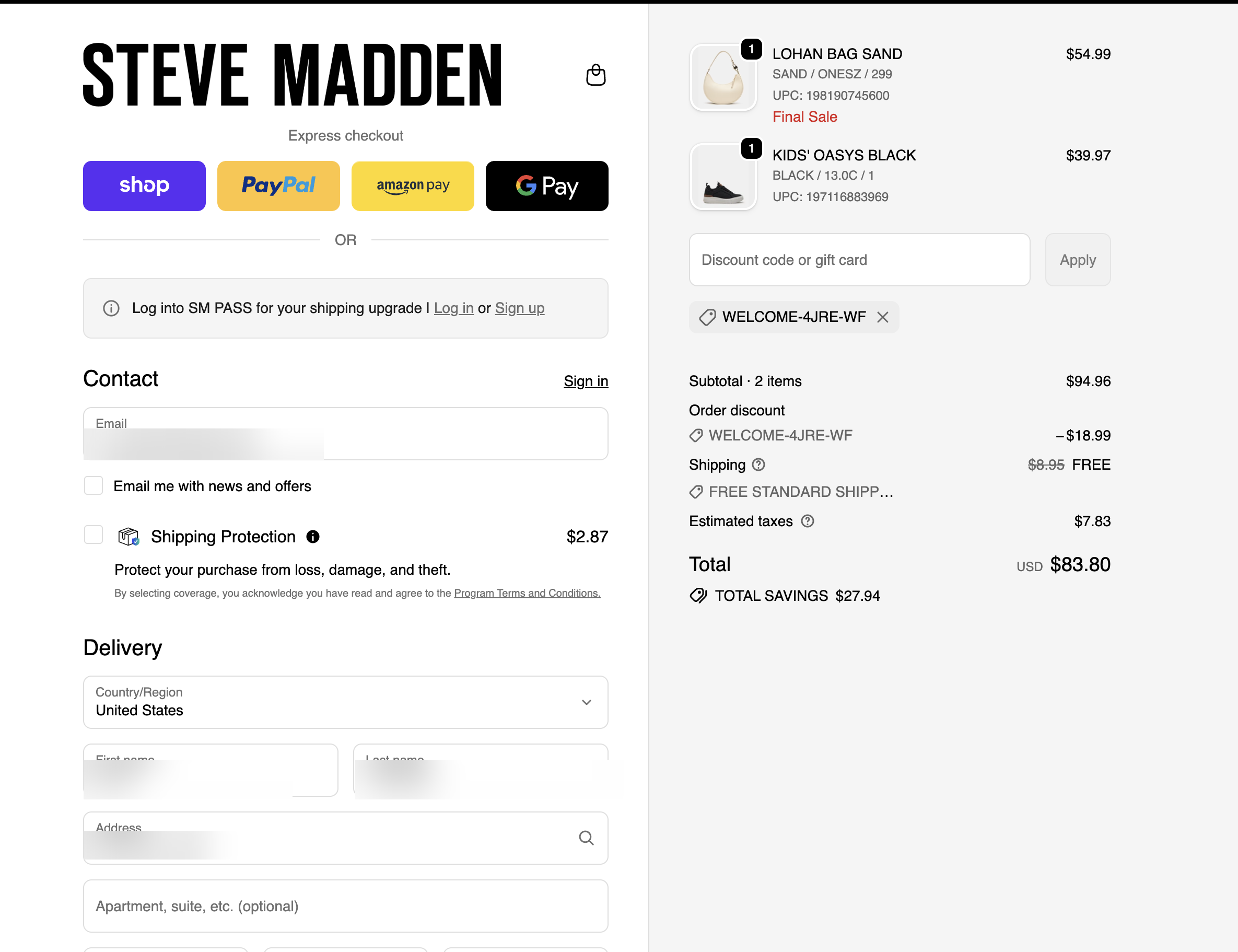
Checkout AFTER — code manually entered
Which coordination broke
The identity layer (header recognizes SM PASS membership across the full session) and the checkout layer (prompts to log in for SM PASS benefits) do not appear to share session state. The customer is prompted to log in to a program they are already recognized as belonging to.
The popup system (captures intent), the email system (delivers the code with a CTA that returns to homepage rather than cart), and the checkout system (applies the discount manually) each operated correctly in isolation. No handoff passed the promo code from the popup session into the checkout session — and the email CTA returned the customer to the start of the funnel rather than advancing them toward completion.
Discussion Points
- Does checkout operate on separate session state from the browsing session — and if so, is that a technical constraint or a configuration choice?
- What does the redemption rate on welcome codes look like — and what percentage of customers abandon checkout before locating the email and manually applying the code?
Finding 2 — Promo + Markdown Stacking Governance
Two items were in the cart at checkout: the LOHAN BAG SAND (already at 29% markdown) and the KIDS' OASYS BLACK (already at 27% markdown). The 20% welcome code WELCOME-4JRE-WF stacked on top of both already-discounted prices. Because the discounted cart subtotal exceeded $75, standard shipping ($8.95) was also waived automatically. Three separate systems — the markdown engine, the promo engine, and the shipping threshold logic — each fired independently, with no visible shared governance.
Examples
LOHAN BAG SAND — 29% markdown; KIDS' OASYS BLACK — 27% markdown
Checkout — welcome code stacks on both SKUs; shipping also waived
The three-layer stack
|
List price |
Markdown price |
Final price |
| LOHAN BAG SAND |
$78.00 |
$54.99 |
$23.01 |
$11.00 |
$43.99 |
|
| KIDS' OASYS BLACK |
$54.95 |
$39.97 |
$14.98 |
$7.99 |
$31.98 |
|
| Total |
$132.95 |
$94.96 |
$37.99 |
$18.99 |
$75.97 |
$8.95 |
Coordination Pattern
The markdown engine (which set both items at sale prices by the merchandising team), the promo engine (which applied the 20% welcome discount on already-marked-down inventory), and the shipping threshold logic (which further waived $8.95 shipping charges) each operated independently. It is unclear how such markdowns compound with a site-wide or category-level promo (including any targeted promos) and if there's a shared governance to evaluate the compound effect across different systems.
Discussion Points
- If a site-wide promo code is active at checkout, what does the compound discount look like — and does margin planning account for that compound?
A related observation: the checkout understates the value delivered
The checkout "TOTAL SAVINGS" display shows $27.94 — the welcome code ($18.99) plus free shipping ($8.95). The markdown savings ($37.99 across both SKUs) do not appear. A customer who saved $65.93 off original prices leaves checkout knowing only $27.94 — 42% of the true savings they captured. A unified savings summary at checkout that reflects the full picture could further reinforce purchase confidence and build the case for a repeat visit.
| View | Savings |
|---|
| Checkout view (discounts called out) | $27.94 (code + shipping) |
| Customer's true savings vs. list prices | $65.93 (markdowns + code + shipping) |
Finding 3 — Social Proof Widget Firing Against Intent
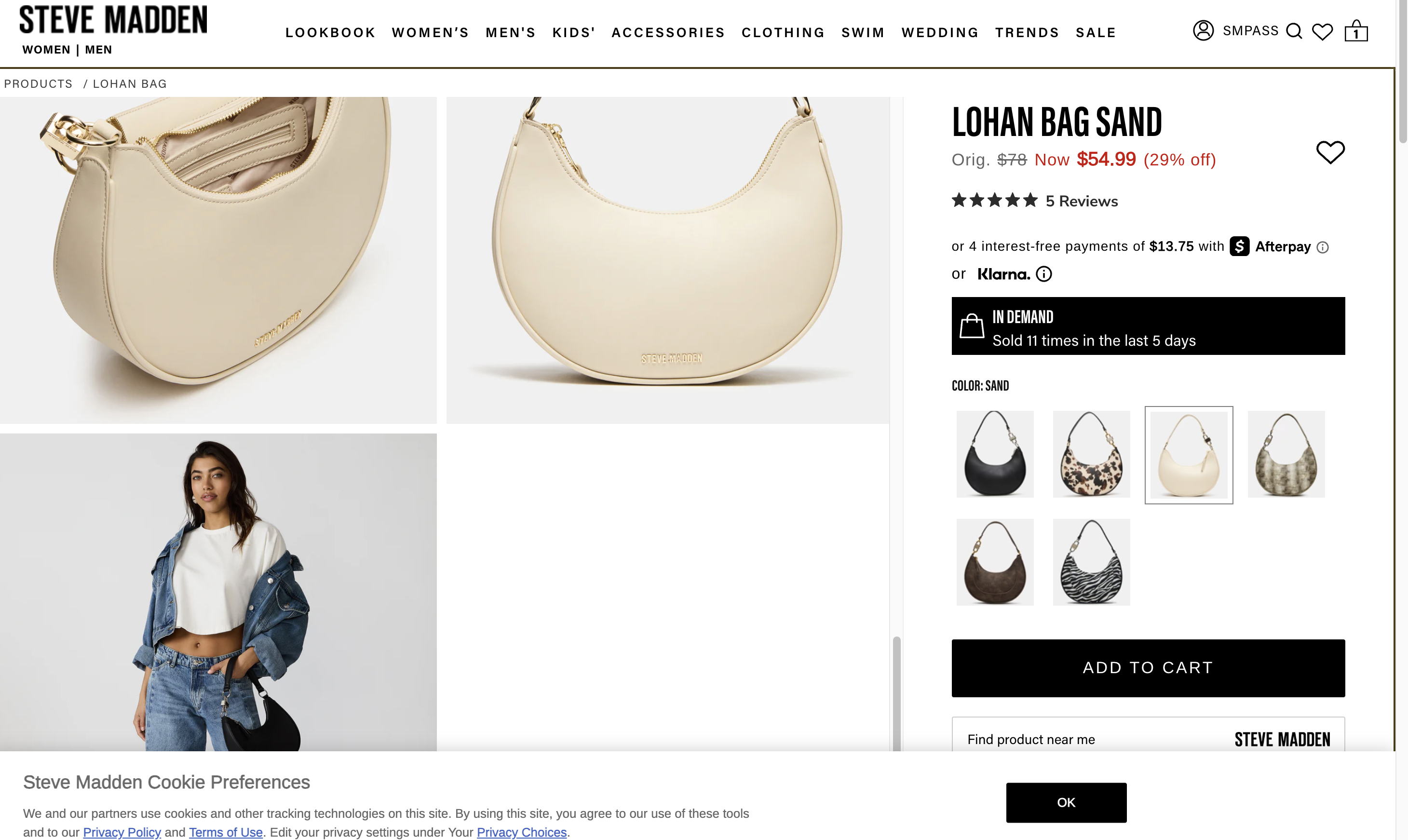
The product detail page for the LOHAN BAG SAND displayed a social proof widget: "IN DEMAND — Sold 11 times in the last 5 days." Social proof is designed to create urgency through high activity signals. When activity is low, displaying the signal could work against its own intent — it could suggest the product is not in demand, potentially reducing rather than increasing purchase confidence.
Example
Discussion Points
Is there a threshold below which the "IN DEMAND" widget should suppress? What activity level would genuinely signal demand for a Steve Madden product — and does the current threshold match that?
Limitations
- This scan reflects a single shopping session. Promo auto-application behavior may differ across sessions, devices, or customer segments.
- SM PASS membership behavior at checkout was observed in one session — it is possible that logging in separately for a loyalty member at checkout unlocks additional benefits or experience not visible in this scan.
- Social proof widget signals and personalization behavior were analyzed only where they appeared on the pages captured.